Everyday modules
Accounts receivable and collections
Who owes you, collecting an installment or a balance, the collection receipt and the financing calculator.
What it is for
When you sell on credit, the sale is split into installments. Accounts receivable, in the Collections group, tells you who owes you, how much is overdue and since when, and from there you collect: the money is applied to the installments, oldest first, and a collection receipt prints. The Financing calculator builds the installment plan before you sell, to show the customer.
Before you start
- The Record payments permission. The calculator needs Invoice.
- Credit sales made at the point of sale, or the opening balance of a customer who already owed you (Customers).
- To collect cash, an open cash register (Your first day). To collect by transfer, an account in Bank accounts.
Who owes you
At the top, three figures: Outstanding (everything owed to you), Overdue (the principal of installments already past due) and Over 90 days. Below, the By customer tab: each customer with their Oldest installment and what they owe by age, Current, 1-30 days, 31-60 days, 61-90 days and Over 90, with the Collect button. Search with Search customer or document.
Collect
Open the customer's collection
Click Collect on their row. Collect from opens with each pending installment: the invoice and installment number, when it is Due, what is Pending and the Late fee if it is late. The overdue installments come checked or, if there are none, the next one due.
Check the installments and the amount
Check or uncheck the installments being paid. Include late fee adds the late charges. Amount to collect comes with everything checked; type less for a partial payment: it covers the oldest first.
The payment method
Choose the Payment method:
- cash: it goes into your open cash register.
- card: copy from the slip the Card brand, the Last 4 digits and the Authorization code, as at the point of sale.
- transfer: choose the account that received the money, type the reference and, if you like, attach the proof of payment.
Your own methods (Zelle, PayPal) show up here too.
Collect and print the receipt
Click Collect with the amount. The collection receipt opens ready for your cash register's printer: what was paid, which installments it covered and what is still owed.
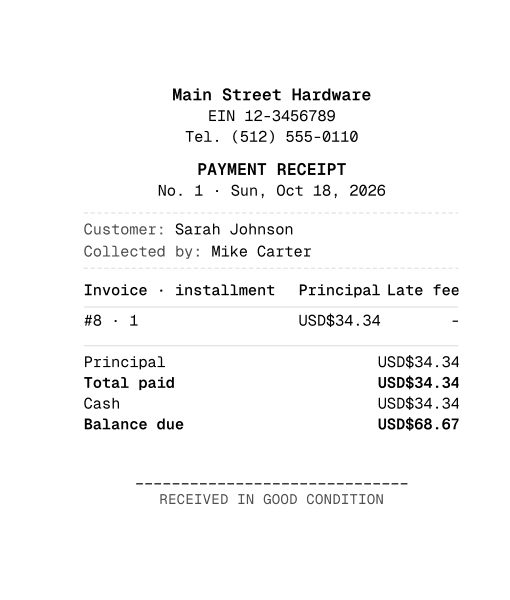
The collection receipts
The Collection receipts tab lists each collection with its Date, Payment method, who Collected by, the Amount and the Balance after. From each row you reprint it or void it.
Voiding a receipt asks for a reason, and every installment it paid is owed again. If it was cash, the money comes out of your open cash register. It needs Void invoices, and nobody voids a collection they recorded themselves, except the owner or an administrator: see History and control.
The financing calculator
The Financing calculator, under Collections, runs the same calculation as a credit sale without selling anything. Enter the Price, the Down payment, the Rate (%) and its Rate period (Flat total, Per installment, Monthly or Annual), the Method (Flat on principal or Fixed installment on balance), the Frequency, the Installments and the First installment. On the right you see the Installment, the Financed amount, the Interest and the Total to pay, with the plan date by date. Print plan hands it to the customer on paper.
If the customer agrees, sell at the point of sale with Credit and the same terms: the plan comes out identical.
By country
Collecting works the same way, with no withholdings or tax receipts. Late fees and interest are collected as part of the receipt.
Common mistakes
- "Open the cash register before taking cash." A cash collection goes into your cash register: open it first, or collect by card or transfer.
- "It cannot exceed..." The amount is more than what is checked. Check more installments or lower the amount.
- "There are no active bank accounts." Create the account in Collections, Bank accounts.
- "You cannot void what you recorded: ask a supervisor." Another person with Void invoices, the owner or an administrator has to void it.
- "That payment is part of a payment receipt: void the receipt." The whole receipt is voided, not a single installment.
Next step
Balance the day's money in the cash register: Cash registers.